Bad Photo Booth Lighting? 12 Problems and Easy Fixes for Better Event Photos
Dark, glary or orange event photos? Learn the photo booth lighting fixes that work, with setups from free to $100 and tips for phones, iPads and laptops.
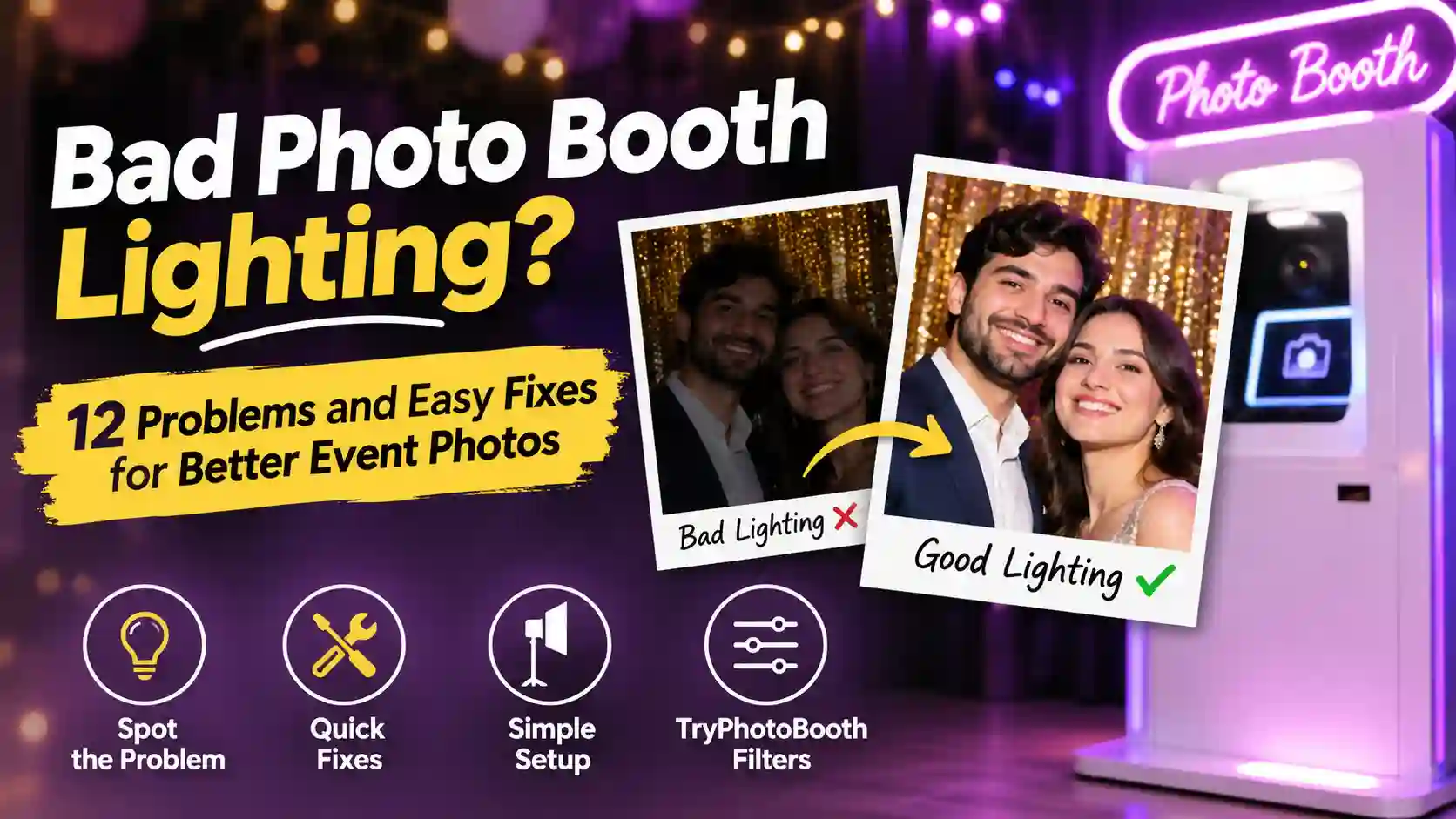
You set up the booth, hung a gold sequin backdrop, and watched your friends laugh through every pose at the party. Then you opened the strips the next morning and found dark faces, orange skin, and a bright glare across your cousin's glasses. That letdown almost always comes from photo booth lighting, because a camera can only record the light you give it. The good news is that most of these problems are cheap to fix, and many cost nothing at all. This guide shows you how to read your strip, fix 12 common problems, and build a simple setup for any budget. You will also see which TryPhotoBooth filters save a strip, so your photo booth lighting works at the next wedding, birthday, or office party.
Why Bad Photo Booth Lighting Ruins So Many Event Photos
Bad lighting ruins event photos because most venues are lit for mood, not for cameras. A dim ballroom with warm bulbs feels cozy to guests. A phone or webcam, however, sees a dark room and tries to brighten it, which adds grain, blur, and an orange tint to every face.
The most common mistake is placing the booth in a quiet corner, far from the room's best light. Hosts then trust the venue to do the rest, but after dinner the DJ dims the lights and the candles take over. Meanwhile, the booth keeps snapping away in near darkness. Your eyes adjust to that room within seconds, so the light looks fine to you, but a camera sensor does not adjust the same way. To learn why soft and hard light behave so differently, read our guide to understanding light in photography. This guide stays focused on the photo booth lighting problems you see at real events.
Spot the Problem Fast: What Your Photo Strip Is Telling You
Your photo strip shows you exactly what went wrong with the light, so you can match the problem to a fix in seconds. Find the issue in the first column, check the usual cause, and try the quick fix before the next guest steps in. If a strip is already saved, the last column shows which TryPhotoBooth filter can rescue it. Most problems show up in the very first strip of the night, so check that one closely on the screen. Zoom in on eyes, foreheads, and the edges of the backdrop, because glare, shine, and shadows like to hide there. You can also keep this table on your phone during the party, so any helper can fix the booth in a minute.
| Problem | Usual cause | Quick fix | Filter rescue |
|---|---|---|---|
| Dark, grainy faces | Dim venue | Front light 3 to 5 ft away | Vintage or Hazy |
| Washed-out faces | Light too close | Move light back, add diffuser | Natural |
| Backdrop shadow | Guests against wall | Step 3 to 6 ft forward | 2x2 collage |
| Glasses glare | Light at eye level | Raise and angle light down | None |
| Orange skin | Warm bulbs, candles | Match or switch off bulbs | Noir |
| Blue skin | Mixed daylight LEDs | Use one light color | Golden |
| Green or purple skin | DJ uplights | Party lights behind camera | Noir |
| Red-eye | Flash near lens | Brighter room, side light | Editor |
| Shiny hot spots | Small hard light | Soften with a diffuser | Smooth |
| Backdrop flare | Light hits sequins | Light from 45 degrees | None |
| Silhouettes | Window behind guests | Turn the booth around | None |
| One dark side | One light, big group | Add a second light | 3-pose strip |
The Three Biggest Lighting Problems at Events
The three biggest lighting problems at events are harsh direct flash, dark venues that leave faces underexposed, and colored party lights that tint skin. Almost every bad strip from a wedding or birthday comes from one of these three, so fix them first.
1. Harsh Direct Flash (and Red-Eye)
Harsh direct flash makes faces look shiny and flat because it throws one small, hard burst of light straight at people. The brightest parts of the face, like the forehead and nose, often turn pure white. Editing cannot bring back that detail, because the camera never recorded it.
The same flash also causes red-eye in dark rooms. According to Wikipedia's page on the red-eye effect, the light bounces off the back of the eye. The problem gets worse when the flash sits close to the lens. That is why a phone flash is the worst photo booth lighting at a dim Christmas party.
The fix is to swap the flash for soft, steady light. A ring light around the camera spreads light evenly across faces, and you can also bounce a lamp off a white wall. Turning the room lights up a little helps too, since brighter rooms cut down red-eye.
2. Dark Venues and Ambient Underexposure
Dark venues cause underexposed photos because the camera does not get enough light to record clear faces. To make up for it, phones and webcams raise their ISO, which adds grainy noise. They may also slow down the shutter, which blurs anyone who moves while laughing.
Good photo booth lighting starts with placement, so move the booth closer to the best light in the room. That could be a window during a daytime graduation party or the main overhead lights at night. Then add one front light about 3 to 5 feet from your guests' faces. Distance matters more than most people expect, because the inverse-square law says that doubling the distance from a light cuts its brightness to one quarter. A ring light 8 feet away gives far less light than the same ring light at 4 feet. If a strip still comes out grainy, the Vintage or Hazy filter turns that grain into a film look.
3. Colored Light Wash From DJ Lights and Uplights
Colored light wash happens when DJ lights, LED uplights or a purple dance floor glow spill onto your guests' faces. Blue light makes skin look gray, green light makes people look sick, and strong red light can wipe out detail in cheeks and lips.
The fix depends on which way the booth faces. Set up the camera so the colored lights sit behind it or off to one side. Guests then face the booth light, while the party lights land on the backdrop instead of their skin. Next, make sure one white light, like a ring light or LED panel, shines directly on faces to cover any color that sneaks in. That white light is the most useful photo booth lighting you can bring to a party with a DJ. When color still shows, switch the strip to the Noir filter, because black and white hides color problems completely.
More Photo Booth Lighting Problems Guests Notice
Beyond the big three, guests spot smaller photo booth lighting problems like glasses glare, backdrop shadows, odd skin tones, shiny spots, silhouettes and uneven groups. Each one has a quick fix that usually means moving a light or a person.
Glare on Glasses
Glare on glasses shows up when the light sits at eye level and points straight at the lenses. The reflection then bounces right back into the camera. Raise the light above head height and tilt it down at about 30 to 45 degrees, which sends the reflection toward the floor instead. If a guest still shows glare, ask them to tilt their glasses down a tiny bit. A ring light can also leave a small circle in the lenses, so move it slightly up or to one side.
Shadows on the Backdrop
Shadows on the backdrop appear when guests stand right against the wall, so their own bodies block the light behind them. Ask everyone to step about 3 to 6 feet away from the backdrop. The shadow will then fall on the floor, where the camera cannot see it. Raising the light a little helps for the same reason. If the room is too small to move people forward, choose the 2x2 collage layout, which crops in tighter and hides more of the wall.
Orange or Blue Skin From Mixed Light
Orange or blue skin comes from mixing lights of different colors, which photographers measure in Kelvin. According to Wikipedia's color temperature chart, candlelight sits around 1,850 K and a standard incandescent bulb around 2,400 K. Electronic flash is much cooler, at around 5,500 to 6,000 K. When mixed photo booth lighting puts a cool ring light next to warm bulbs, faces turn orange on one side and blue on the other. Turn off the warm overheads, or set an adjustable light to match. If a strip still looks cold, the Golden filter warms it up.
Shiny Backdrops and Hot Spots
Shiny backdrops and hot spots appear when a small, hard light hits a sequin wall, foil curtain or oily forehead head-on. Move the light to one side at about 45 degrees so the flare bounces away from the lens. Softening the light helps as well, so try a softbox, a white umbrella or a white bedsheet in front of the lamp. The Smooth filter can then calm any shine left on skin.
Backlit Windows and Silhouettes
Backlit silhouettes happen when a bright window or stage light sits behind your guests. The camera then exposes for the bright background and turns faces into dark shapes. The fix is simple, because you only need to turn the whole booth around so the window lights your guests from the front. That window then becomes free, soft light instead of a problem.
One Side of the Group Is Dark
One side of a group goes dark when a single small light tries to cover five or more people. Place two lights at about 45 degrees on either side of the camera. You can also use one larger light and move it farther back so it spreads wider. For smaller groups, the 3-pose strip keeps everyone closer together and evenly lit.
The Ideal Photo Booth Lighting Setup, Step by Step
The ideal photo booth lighting setup uses one soft main light just above eye level and a weaker fill light at the side. Guests stand a few feet off the backdrop, and every light is set to the same color. Follow these six steps before guests arrive.
- Place the main light. Put a ring light or softbox at camera height or slightly above. Keep it about 3 to 5 feet from where faces will be, and tilt it slightly down.
- Add a fill light. Set a second, dimmer light off to the side. It softens the shadows that the main light leaves on the other half of the face.
- Leave a backdrop gap. Mark a spot on the floor with tape about 3 to 6 feet in front of the backdrop. Guests will then know where to stand.
- Match the color. Set all your lights to the same color temperature, or switch off any room lights that don't match them.
- Set the white balance. If your camera or phone lets you choose, set white balance to daylight when you use daylight LEDs.
- Shoot a test strip. Take a full Korean 4-cut strip of yourself and check it for glare, shadows, and color. Fix anything off before the first guest arrives.
Best Lighting for a Photo Booth: Gear by Budget
The best lighting for a photo booth is soft, steady light with adjustable color, and you can get it at almost any budget. Use the table below to match your gear to your crowd size and spending limit.
| Budget | Gear | Best for |
|---|---|---|
| Free | Window light plus a white foam board bounce | 1 to 3 people, daytime |
| Under $30 | 10 to 12 inch clip-on ring light | 1 to 2 people |
| Under $100 | 18-inch ring light plus one LED panel | 2 to 4 people |
| Party-sized | Two softboxes or LED panels at 45 degrees | 5 or more people |
When you shop for a photo booth lighting kit, look for two things on the box. The first is adjustable color, roughly 3,000 to 6,000 K, so you can match warm or cool rooms. The second is a high CRI rating, which measures how true a light shows colors on a scale up to 100. Typical white LEDs score 80 or more. Aim for CRI 90 or higher, though, so skin looks natural instead of pale or greenish. Continuous photo booth lighting also makes more sense than a strobe for phone, iPad and webcam booths, because those devices can't sync with a flash. A steady light lets guests see their pose on screen before the countdown ends, too.
Photo Booth Ring Light: What Size Do You Need?
The right photo booth ring light size depends on how many people fit in each shot. A 10 to 12 inch ring light works well for one or two people standing close. That size suits a small birthday party or a bedroom booth. An 18-inch ring light usually covers groups of two to four, which makes it the easiest photo booth lighting upgrade for weddings. For bigger groups, add LED panels on a light stand at each side. A single ring light can't spread far enough to light a whole row.
DIY Photo Booth Lighting With Things You Already Own
DIY photo booth lighting can cost nothing if you use what is already in your home. Set the booth beside a large window so daylight falls on guests from the side. Avoid direct sun, though, because it causes squinting and hard shadows. Hold up white foam board or tape a white bedsheet on the darker side to bounce light back onto faces. After sunset, clip baking paper in front of a desk lamp to make a cheap diffuser. Keep the paper well away from the hot bulb so it stays safe. Finally, switch off any overhead lights that clash in color with the rest of your setup.
Photo Booth Lighting for Digital Booths on Phone, iPad and Laptop
Photo booth lighting works the same way on a phone, iPad or laptop, so every fix above still applies. Small device cameras struggle more in dim light, though. A few extra tips help when you run a free online photo booth like TryPhotoBooth in your browser.
iPhone and Android Phones
On an iPhone or Android phone, tap on a guest's face before the countdown to tell the camera where to set exposure and focus. Clip a small ring light onto the phone stand, and skip the front screen flash, which gives a harsh, flat look. Keep the phone at eye level or a little above. Our guide to using a photo booth on iPhone without an app covers the rest of the setup.
iPad Photo Booths
An iPad makes a great booth screen because guests can see themselves while they pose. The best ring light for an iPad photo booth has a tablet holder in the center, so the light wraps evenly around the camera. Turn the screen brightness up, since a bright screen adds a little extra light to faces too. Then raise the iPad on a stand to just above eye level.
Laptop Webcam Booths
Laptop webcams have tiny sensors, so they need more light than phones to stay sharp. Face the laptop toward a window or lamp rather than sitting with your back to it. A bright white screen also acts like a small soft light, so a plain white page open behind the booth helps. A clip-on webcam light for a MacBook or Windows laptop is cheap and works well. Our laptop photo booth guide explains more.
Photo Booth Lighting Ideas That Look Good on Purpose
Some photo booth lighting ideas use mood light on purpose, as long as one clean light still lands on faces. Hang fairy lights behind guests for soft sparkle, then pair the strip with the Golden filter for a warm wedding glow. A neon sign behind the group looks great in a Y2K-style Layout B strip. For a Halloween party, one low side light gives a spooky, moody shot that you can finish in Noir. A disco ball corner works for birthdays if you keep a separate light on faces. Outdoors, shoot at golden hour for warm, flattering light with no gear at all. For a clean look like the Life Four Cut booths in Seoul, use one big, soft light in front. Then set the camera at a slightly high angle.
How to Fix Bad Lighting in Photos After the Event
You can fix some bad lighting in photos after the event, but not all of it. Editing is a backup plan for weak photo booth lighting, not a cure. Editing can brighten dark faces and remove small color casts, yet it cannot bring back highlights that harsh flash turned pure white. To fix bad lighting in a photo on iPhone, open it in Photos, tap Edit, and adjust Exposure, Shadows and Warmth. After that, try a filter. Noir hides color problems, Golden warms cold faces, Smooth calms shiny skin, and Vintage or Hazy makes grain look like film. Our photo booth filters guide shows each one side by side. Before printing on a Canon SELPHY, brighten the strip a little, because prints usually look darker than the screen. Our guide to photo paper for printing at home explains why.
Frequently Asked Questions
What is the best lighting for photo booth pictures?
Soft, steady photo booth lighting works best, such as a ring light, softbox or LED panel placed just above eye level in front of guests. Choose lights with adjustable color and a CRI of 90 or higher for natural skin tones.
What size ring light do I need for a photo booth?
A 10 to 12 inch ring light suits one or two people, while an 18-inch ring light usually covers groups of two to four. For bigger groups, add a second light on the side of the booth.
Should a photo booth use flash or continuous light?
Continuous light works better for phone, iPad and laptop booths because those cameras can't sync with a strobe. It also lets guests see how they look before the shot, which usually leads to better poses.
How do I stop glare on glasses in photo booth pictures?
Raise your light above head height and angle it down about 30 to 45 degrees, so the reflection bounces toward the floor. If glare still shows, ask the guest to tilt their glasses down slightly.
How far should people stand from the photo booth backdrop?
Guests should stand about 3 to 6 feet in front of the backdrop. That gap lets their shadows fall on the floor instead of the wall, which keeps the background clean behind them in every frame.
How do I set up DIY photo booth lighting at home?
Place the booth beside a window for daytime light, bounce it with white foam board or a bedsheet, and turn off mismatched overhead lights. At night, a desk lamp with baking paper in front makes a simple diffuser.
Good Light, Better Strips
Great strips come from three simple habits. Put one soft light in front of faces, keep everyone a few feet off the backdrop, and use one color of light. Once you get those right, most other problems disappear, and the rest can be fixed by moving a light or a guest. Good photo booth lighting doesn't need a rental company or expensive gear. Open TryPhotoBooth tonight, shoot a test strip in your living room, and see the difference before your next party.
Keep Reading
If you want to plan the rest of your booth, these guides pick up where this one ends:
Ready to try this in your browser?
Launch our free 3D studio, test out vintage filters, and save your photo strip instantly.